


Scheduled Syncs: Keep Every Shopify Store Up to Date, Automatically
The SimpleSync Team · Updated January 14, 2026
Copying a store is a moment. Keeping stores identical is a job. It's the job that quietly eats multi-store operations alive. Every new product, every price-list PDF, every edited size guide has to be repeated across every storefront, forever, without missing one.
Scheduled syncs turn that forever-job into a setting. Configure the connection once, and SimpleSync updates your destination stores from your source store every day: automatically, comprehensively, without anyone remembering to do it.
Here's exactly how they work, what they include, and the honest details that make them dependable.
How a scheduled sync works
You choose a source store, a destination store, and the content types to keep in sync: products, collections, pages, blogs and articles, files, metafields, metaobjects, URL redirects, translations. From then on, once a day, SimpleSync brings the destination up to date with the source for every type you selected.
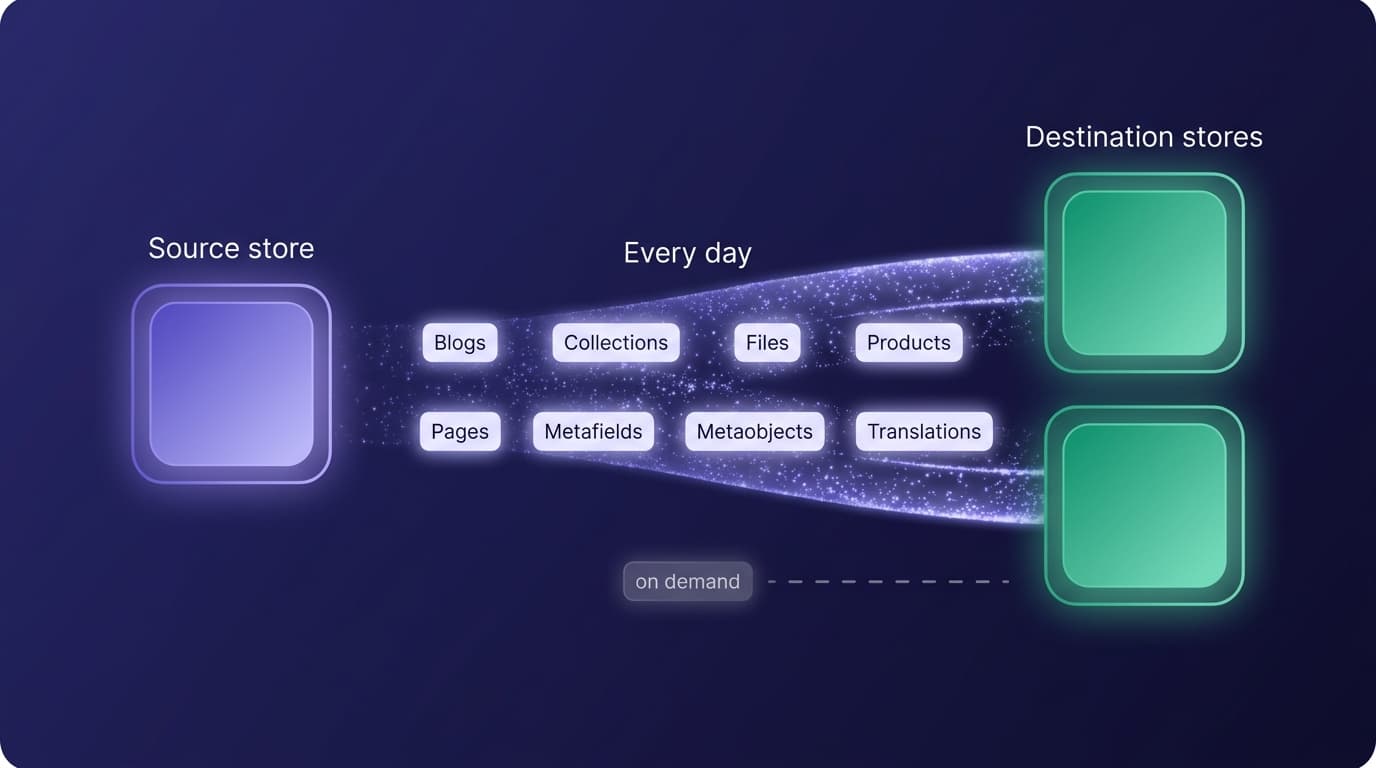
New items appear. Edited items update. The structured layer (metafield definitions, metaobject entries, the references between them) stays linked, the same way it does in one-time copies. Your destination stores simply start every morning current.
Comprehensive by design
Here's a detail we state plainly, because it's a design decision worth understanding: a scheduled sync includes all items of each content type you select. Pick products, and every product syncs. Not a subset.
That comprehensiveness is the feature. Mirrors that sync "most" of a catalog drift, and drift is precisely the problem schedules exist to kill. When a destination should be a faithful reflection of the source (a regional twin, a staging store, a brand mirror), all-items-per-type is the only behavior that keeps the promise.
When you don't want a full reflection, that's not a schedule's job: it's a one-time copy's, which is selective down to the individual item. Curated subsets (the outlet store, the B2B slice) run on one-time copies you trigger when the subset changes; true mirrors run on the schedule. Multi-store operators typically use both, per connection.
And themes ship on demand, deliberately. Theme copying is a one-time operation, not part of the daily schedule. Your design changes go live when you decide they're ready, not because a clock struck. When the redesign's done, run the theme copy and the new look arrives everywhere you send it.
Four setups that run on schedules
The regional mirror. A US flagship and its EU twin, carrying the same catalog with local pricing and taxes. The schedule keeps content identical across the ocean; translations sync by locale so each storefront reads native; settings stay local because they never sync.
The always-fresh staging store. A staging environment is only as useful as it is current. On a schedule, staging re-baselines from production daily: every morning your test environment is your store, and yesterday's experiments meet today's real data.
The B2B reflection. A wholesale storefront that shows the same products with different prices and terms. Content mirrors on the schedule; the B2B store's own payment terms, catalog pricing, and checkout remain untouched. Shared catalog, separate commerce.
The brand network. Several storefronts drawing pages, files, metaobject libraries, and policy content from one hub, so brand updates propagate overnight instead of by checklist. This is the maintenance layer under every serious multi-store operation.
Different shapes, one common trait: in each, a human used to be the sync mechanism. The schedule retires that job.
The source of truth, enforced
Scheduled syncs give a multi-store team something rare: a rule the software actually enforces. For every synced content type, the source store wins: each run updates destinations to match it.
That means shared content has exactly one home. Edit the product description in the source and every mirror carries it tomorrow; edit it in a destination and the next run restores the source's version. Teams internalize this fast, and it's liberating: no more wondering which store has the "real" copy of anything. Content that should differ per store simply lives in types you leave out of that connection's schedule.
What scheduled syncs will never touch
The same boundaries that make SimpleSync safe for copying make it safe to automate. A scheduled sync never moves customers, orders, inventory quantities, navigation menus, store settings, or app configurations. Each storefront's commerce identity (its checkout, taxes, shipping, stock) remains entirely its own, no matter how tightly its content mirrors the source. Automation you don't have to think about is only possible with boundaries you never have to worry about. The full picture is in the duplication checklist.
Setting it up
- Install SimpleSync on the source and each destination store. One subscription on the source covers everything: plans connect 2, 5, or 15 destinations, each with a free trial.
- Connect the stores with the connection key from the source store's dashboard.
- Run the first full copy so destinations start from a complete baseline (definitions and referenced items first if you're metafield-heavy).
- Enable the schedule and select the content types to keep mirrored on each connection.
- Check back tomorrow, then stop checking. That's the point.
Frequently asked questions
How often do scheduled syncs run? Daily. Each run updates your destination stores from the source, so every storefront starts the day current.
Can I choose specific items to include in a schedule? Schedules operate at the content-type level and include all items of each type you select. That comprehensiveness is what prevents drift. To move a hand-picked subset of items, use a one-time copy, which is selective down to the individual item.
Are themes included in scheduled syncs? No. Themes copy on demand as a one-time operation. Design changes ship deliberately, when you choose, rather than propagating on an automatic schedule.
What happens to edits made directly in a destination store? For synced content types, the next run updates them from the source. The source of truth wins. Keep spoke-specific content in types you leave out of the schedule, and edit shared content in the source only.
Does a scheduled sync ever touch orders, customers, or settings? Never. Syncs move content: products, collections, pages, blogs, files, metafields, metaobjects, redirects, translations. Each store's customers, orders, and commerce settings remain entirely its own.
Related guides
- What copies when you duplicate a Shopify store: the full picture of what a copy touches and what it never does.
- The complete Shopify store migration guide: for a one-time move rather than an ongoing sync.
- Manage multiple Shopify stores from one source of truth: the hub-and-spoke model this post's schedules keep running.
- Set up a Shopify staging store: the always-fresh staging setup described above.
- Copy products between Shopify stores: the one-time copy this post contrasts schedules against.
- Copy metafields and metaobjects between Shopify stores: how the structured-data linking this post relies on actually works.
The job that runs itself
Some work rewards attention. Keeping stores identical isn't that kind of work: it rewards automation, done comprehensively, every day, without fail.
Start your free trial of SimpleSync, set the schedule once, and let tomorrow take care of itself.