


How to Copy Products Between Shopify Stores (Collections and Pages Too)
The SimpleSync Team · Updated September 18, 2025
The CSV route for moving products between Shopify stores is a rite of passage nobody should repeat: export, fix the columns, lose the images, re-upload the images, discover the variants scrambled, and abandon the metafields entirely. Shopify's product CSV doesn't carry them.
Here's the version that takes minutes instead: copy products directly from store to store, complete: every variant, every image and video, descriptions, tags, and the metafields your theme actually renders. Pick three products or move three thousand.
When you'll reach for this
Product copying is the workhorse move behind a surprising range of projects:
Launching a second storefront. A new region, a pop-up, a wholesale channel: the fastest way to stock it is to send over the exact products it should carry, complete, and adjust locally from there.
Splitting a catalog. When one store grows two audiences (retail and B2B, two distinct brands under one roof), copying the relevant slice of products into a dedicated store beats rebuilding it, and beats forcing one storefront to serve everyone.
Seeding a test or development store. Real testing needs real products: actual titles that overflow, actual image ratios, actual variant sprawl. Copy a representative slice into a dev store and your staging environment behaves like production.
Sharing a catalog with a partner store. Wholesale relationships and licensed sellers often need your products, presented properly, in their store. A selective copy hands them exactly the approved lineup.
In every case the alternative is the CSV, and the CSV tops out fast. Shopify's product export doesn't carry metafields, mangles media into URL columns, and turns variants into a puzzle. It was built for spreadsheets, not for moving living products between stores.
What "complete" means
When SimpleSync copies a product, the destination store receives the whole product, not a spreadsheet's shadow of it:
- Every variant: options, SKUs, prices, barcodes
- All media: images and video, no re-uploading
- Descriptions and tags: formatting intact
- Product metafields: definitions and values, with references relinked
That last line is the one CSVs can't touch. Modern product pages run on metafields (spec tables, size guides, linked metaobjects), and SimpleSync carries them across with their references still connected. If your products lean heavily on referenced metaobjects, one tip: sync the referenced items first so everything links on arrival. The metafields guide shows the order in two minutes.
Copying products: step by step
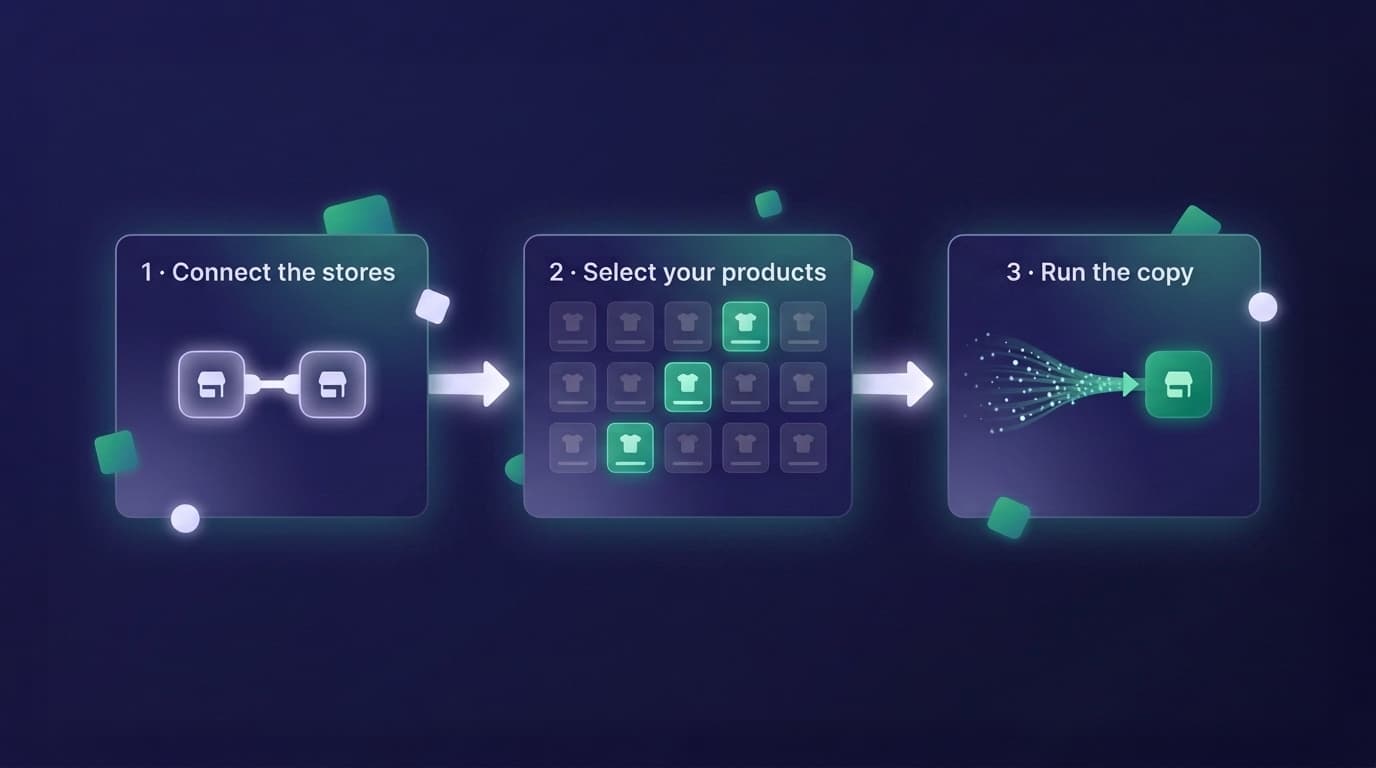
- Install SimpleSync on both stores. Subscription on the source store only, every plan includes a free trial.
- Connect the stores using the connection key from the source store's dashboard in the app.
- Click "Copy from this shop" on the source store and choose products as your content type.
- Select your items. One-time copies are selective down to the individual product, a hand-picked capsule or the entire catalog.
- Run and verify. Open a few copied products in the destination: variants, media, metafield-driven sections. They should look like they've always lived there. Everything they depend on came along.
One operational note: syncs run one at a time per connection, so a very large catalog is a single long run rather than several parallel ones. Start it, and let it work.
Bring the collections and pages too
Products rarely travel alone. They live in collections and get sold by pages. Include those in the same operation:
Collections, both kinds. Manual collections arrive with their product assignments. Smart collections arrive with their rules working: just copy any metafield definitions their rules depend on first, and the collections populate themselves in the destination.
Pages and blog content. Landing pages, lookbooks, buying guides: the content that sells the catalog moves alongside it, metafields included.
If what you actually need is the whole store (theme, files, redirects, translations, everything), you've outgrown this post in the best way: the complete duplication checklist maps the full move, and the migration guide walks it end to end.
One boundary to plan around
Product records copy completely; inventory quantities don't. Stock levels are deliberately left for you to set in the destination store, manually or via Shopify's inventory CSV. It's a quick step, and it's on you by design: the right stock number for a new store is a business decision, not a copy operation.
Keep them matching, automatically
If this isn't a one-off, if the destination store should stay stocked with the source's products, skip the repeat runs and put the connection on a daily scheduled sync. Every product added or edited in the source appears in the destination the next day, hands-free. That's the backbone of every multi-store setup, and it starts with exactly the copy you just ran.
Frequently asked questions
Do product images and videos come along? Yes. All product media transfers with the product, along with variants, descriptions, tags, and metafields. No re-uploading.
Can I copy just a few specific products? Yes. One-time copies are selective down to the individual item, move three products or three thousand, your choice.
Do both stores need the app? Do both need a subscription? The app is installed on both stores, but the subscription lives on the source store only. The destination store carries no charge.
Does copying products affect my source store? No. Copies read from the source and write to the destination. Your original products are never modified.
Do inventory quantities transfer with the products? No. Product records copy completely, but stock levels don't. Set inventory in the destination store manually or with Shopify's inventory CSV.
Related guides
- What copies when you duplicate a Shopify store: the full checklist if products are just one part of a bigger move.
- The complete Shopify store migration guide: the end-to-end walkthrough for a full store move.
- Set up a Shopify staging store: copy a representative slice of products into a test environment.
- Copy metafields and metaobjects between Shopify stores: the sequencing rules behind the metafields section above.
- Manage multiple Shopify stores from one source of truth: if this copy is the start of an ongoing network, not a one-off.
- Scheduled syncs: to keep the destination store's products current automatically.
Minutes, not spreadsheets
Your products took years to build. Moving them shouldn't cost you a weekend of CSV surgery, and now it doesn't.
Start your free trial of SimpleSync and copy your first products before the coffee's cold.