


How to Manage Multiple Shopify Stores From One Source of Truth
The SimpleSync Team · Updated July 10, 2026
The second store is where multi-store operations quietly break.
One storefront is manageable by hand. The moment there are two (a US and an EU store, a retail and a B2B split, a second brand), every product edit, every new collection, every updated size guide becomes a task performed twice. At three stores it's a part-time job. At five it's a full-time one, done badly, because manual replication always drifts.
The operators who make multi-store look effortless all converge on the same architecture. Here's how to build it.
The hub-and-spoke model
Designate one store as the hub: the single source of truth where your team creates and edits catalog and content. Every other storefront is a spoke that receives its content from the hub automatically.
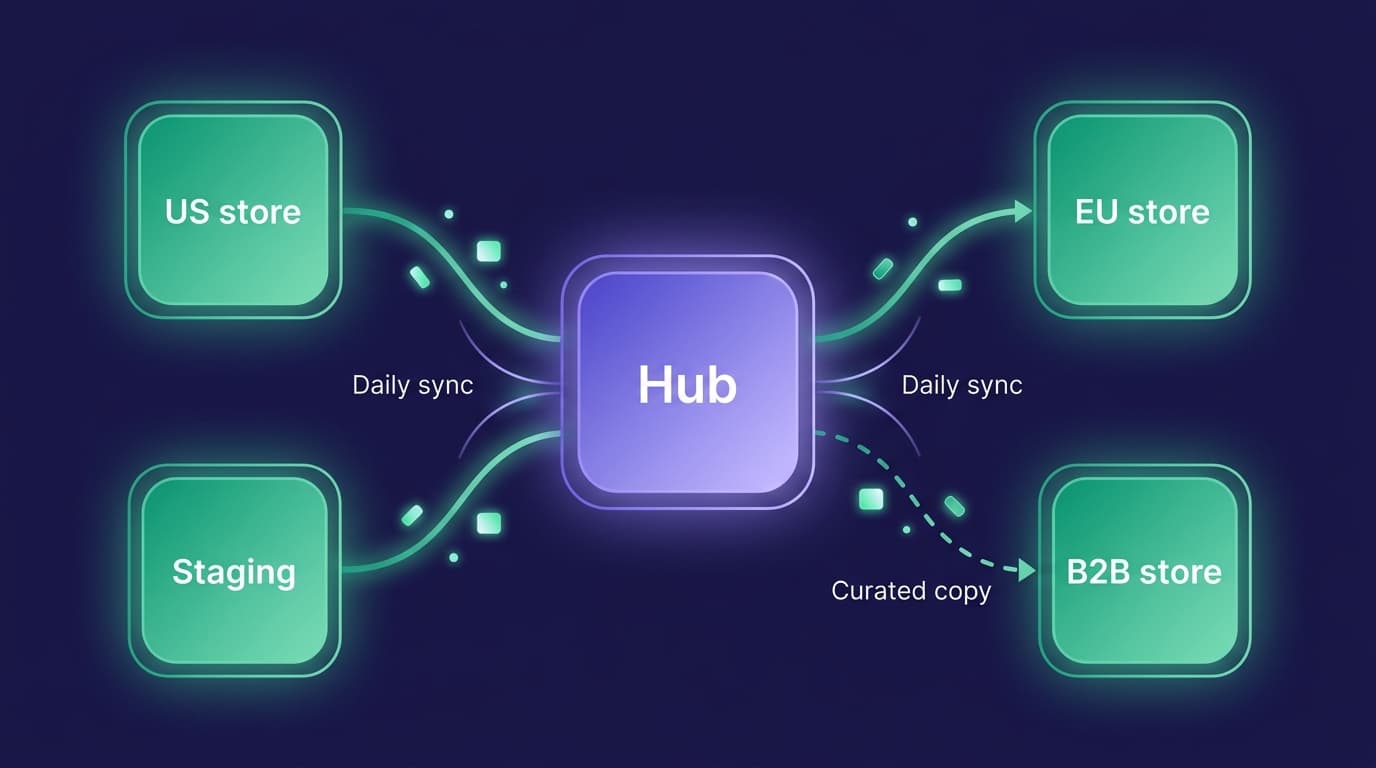
The rule that makes it work is discipline, not software: shared content gets edited in the hub, only in the hub. Products, collections, pages, blog posts, files, metafields, metaobjects: created once, propagated everywhere. What stays per-store is everything local: pricing configuration, payments, shipping, taxes, domains, and whatever content you deliberately keep out of the sync.
This division is exactly the line SimpleSync draws. Content syncs; store settings never do. Each spoke remains a fully independent business surface (its own checkout, its own tax setup, its own market) wearing a catalog it never has to maintain.
The four networks we see most
Regional storefronts. One brand, several markets (US, EU, UK, APAC) each with local pricing, taxes, and currency, all wearing the same catalog. The hub holds the master content; each regional spoke mirrors it daily and serves its market natively, translations included.
Retail + B2B. The same products sold two ways. The consumer store and the wholesale store share the catalog from the hub, while each keeps its own pricing structure, payment terms, and checkout. It's the same hub-and-spoke split, just applied to one brand instead of many.
Sub-brands and spin-offs. A brand portfolio where each label gets its own storefront and its own curated slice of the master catalog, fed by selective copies from the hub. New label? New spoke, stocked in an afternoon.
The agency fleet. Agencies run the pattern professionally: a client's production store as hub, with staging and development spokes always current for safe work, and because the subscription lives hub-side only, client stores connect with nothing but an install.
Whichever shape fits, the setup is identical:
Setting up the network
- Choose the hub. Usually your original or largest store, wherever the team already works.
- Install SimpleSync on every store. The subscription lives on the hub only; spokes just need the app. One plan covers the network.
- Connect each spoke using the connection key from the hub's dashboard in the app.
- Run the first copy to each spoke. For metafield-rich catalogs, sync definitions and referenced items before the products that reference them. The metafields guide gives you the order.
- Turn on daily scheduled syncs for the content types each spoke should mirror. From here, the network maintains itself: edit in the hub today, every spoke reflects it tomorrow.
Full mirror or curated subset, per spoke
Not every spoke should carry everything, and the two sync modes map cleanly onto the two situations:
Scheduled syncs are for mirroring. They include all items of each content type you select for that connection. Comprehensive by design, which is what keeps a true mirror from drifting. Regional twins and staging stores live here.
One-time copies are for curating. They're selective down to the individual item, so a spoke that should carry only part of the catalog (the B2B store that sells in bulk cases instead of single units, the outlet that only gets last season's stock) receives exactly its subset, refreshed on your schedule rather than the daily one.
Many networks mix both: schedules for the types that should always match (metaobjects, files, policy pages), curated one-time copies for the catalog slice. Decide per spoke, per content type.
Localizing the spokes
A regional storefront needs more than the catalog. It needs the language. SimpleSync copies translations by locale: send French content to the EU spoke, German to the DACH spoke (Germany, Austria, Switzerland), each store receiving the locale it serves. Prices, taxes, and payment methods were already local, because settings never sync. The result is a storefront that feels native while its content stays centrally managed.
Sizing the network
| Plan | Destination stores | Best for |
|---|---|---|
| Pro | up to 2 | Hub + staging, or a first regional spoke |
| Advanced | up to 5 | Multi-region brands, retail/B2B splits |
| Business | up to 15 | Brand portfolios, franchise networks, agencies |
All from a single hub subscription, all with a free trial, and destinations can be unlinked and relinked as the network evolves. Agencies running client networks: the hub-side-only subscription means client stores connect with nothing but an install.
Frequently asked questions
Do all my stores need a subscription? No. One subscription on the hub (source) store covers the whole network. Every destination store just needs the app installed.
Can each destination store carry a different subset of the catalog? Yes, through selective one-time copies: you choose exactly which items each store receives. Daily scheduled syncs are comprehensive by design: they include all items of each content type you select for that connection.
Can destination stores have their own prices, taxes, and payment settings? Yes. Store settings never sync: each storefront keeps its own payments, shipping, taxes, and markets. Only the catalog and content travel between stores.
What happens if someone edits synced content directly in a destination store? On the next scheduled run, synced content types are updated from the hub. The source of truth wins. Make hub-only editing for synced types a team rule, and give each store its local content through types you leave out of the schedule.
How many stores can I connect? Pro connects up to 2 destination stores, Advanced up to 5, and Business up to 15, all simultaneously from one source store. Destinations can be unlinked and relinked as your network changes.
Related guides
- The complete Shopify store migration guide: for a one-time move rather than an ongoing network.
- What copies when you duplicate a Shopify store: the full checklist of what transfers automatically and what doesn't, useful before connecting your first spoke.
- Copy products between Shopify stores: a closer look at what happens to variants, images, and metafields during a copy.
- Copy metafields and metaobjects between Shopify stores: the sequencing rules referenced in Step 4 above, explained in full.
- Set up a Shopify staging store: the same hub-and-spoke idea applied to one dedicated testing spoke.
- Scheduled syncs: the feature that keeps every spoke mirroring the hub automatically.
One catalog. Every storefront. Zero double entry.
Multi-store shouldn't mean multiplying your workload by the number of stores. Build the hub, connect the spokes, and let the network maintain itself while your team edits in exactly one place.
Start your free trial of SimpleSync and bring your second store (or your fifteenth) under one source of truth.