


How to Copy Metafields and Metaobjects Between Shopify Stores
The SimpleSync Team · Updated July 12, 2026
Metafields and metaobjects are where modern Shopify stores keep their intelligence: size charts, ingredient panels, designer profiles, spec tables, the structured content that themes render into rich pages. They're also one of the trickiest parts of any store to copy.
The reason is invisible until it bites you: IDs don't travel. Every metafield definition, metaobject entry, file, and product carries a unique Shopify ID. The moment that item is recreated in another store, it gets a brand-new ID. Any reference still pointing at the old one points at nothing. Copy a store naively and you get products that look complete while every size chart, every linked metaobject, every file field silently comes up empty.
SimpleSync was built to solve exactly this. Here's how it works, and how to run a copy where every reference survives.
Definitions and entries: both travel
Quick vocabulary, then the good news.
A metafield definition is the schema: "products have a field called care_instructions of type rich text." The values are each product's actual care instructions. Likewise, a metaobject definition describes a structure ("a Designer has a name, a photo, a bio"), and entries are the actual designers.
SimpleSync copies all of it: metafield definitions and values for products, variants, collections, pages, blogs, and articles; metaobject definitions and their entries. You don't rebuild schemas by hand in the new store. The structure arrives with the data, ready for your theme to render.
The ID problem, and the mapping that solves it
When SimpleSync copies an item, it records the pairing: source ID → destination ID. That growing translation table is the ID map, and it's what makes references work.
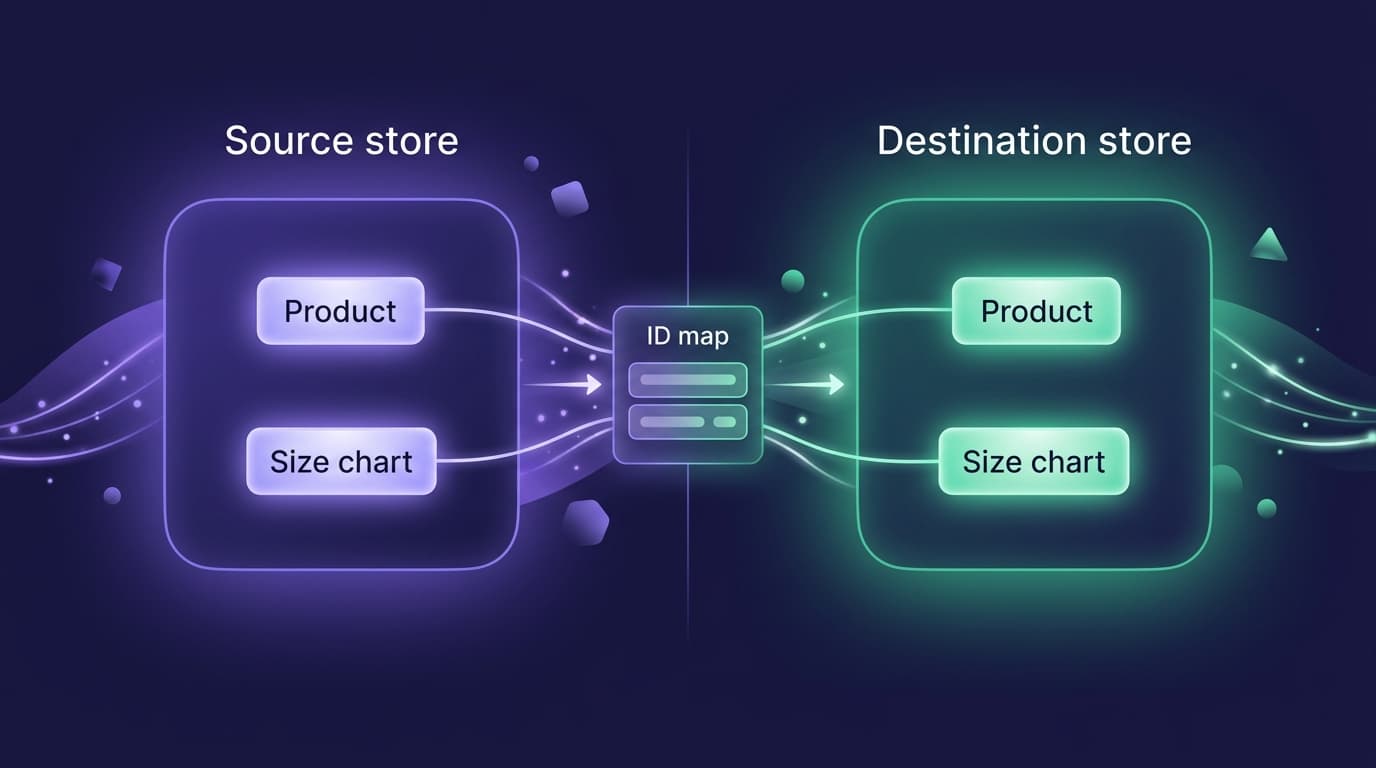
When a metafield that references a metaobject comes across, SimpleSync looks up the metaobject's new ID in the map and relinks the reference to the destination copy. Your "Designer" field on a product points at the right designer in the right store, automatically.
There's one condition, and it's the single most important sentence in this guide: a reference can only be relinked if the item it points to has already been synced. No prior sync, no map entry, nothing to relink to.
The golden rule: sync in dependency order
That condition gives you the correct order for any metafield-heavy copy:
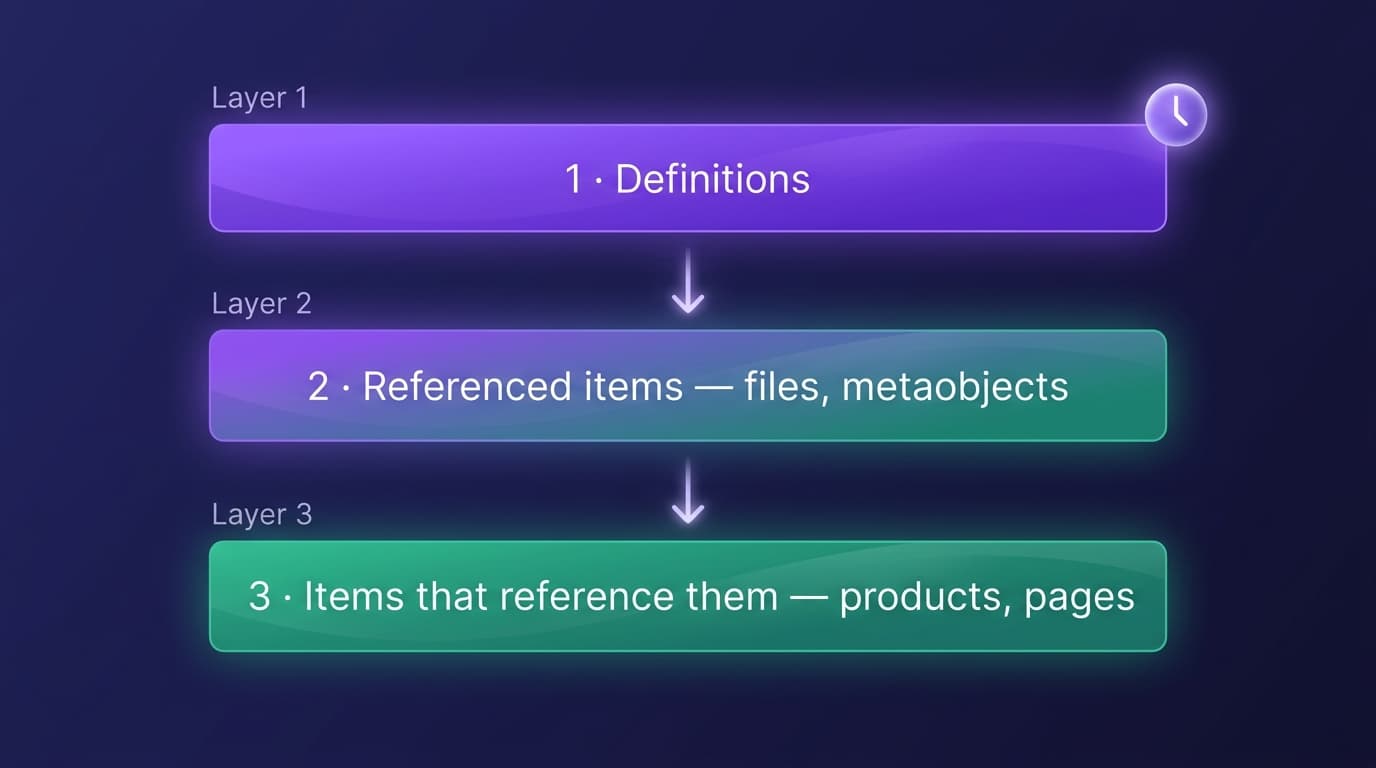
- Definitions first. Metafield and metaobject definitions: the schemas everything else conforms to.
- Referenced items second. Files, metaobject entries, and any products or collections that other items point at.
- Referencing items last. The products, pages, and articles whose fields point at the layer above.
Run it in this order and references connect on arrival. Deep chains work the same way, layer by layer: a product referencing a metaobject whose fields reference files means files → metaobject entries → product.
Common errors, decoded
An error about a missing ID mapping means the copy hit a reference to an item that hasn't been synced through SimpleSync yet. Not corruption, just order. Sync the referenced item type, then retry; the reference connects.
A smart collection fails to copy. Smart collections whose rules use metafield definitions need those definitions to exist in the destination first. Definitions, then the collection.
A reference field arrives empty. Same cause as the mapping error, quieter symptom: the referenced item wasn't in the map, so the reference was skipped rather than pointed at nothing. Sync the missing layer and run again. SimpleSync never guesses at a destination ID, because a wrong link is worse than an empty one.
Multi-file fields. A metaobject entry with a field holding several images comes across intact, once those files have been synced and mapped.
One boundary to know: Company and Customer reference types don't transfer, consistent with SimpleSync's rule of never copying customer or B2B account data between stores.
A worked example: moving a size-guide system
Say your apparel store runs size guides the modern way: a Size guide metaobject definition (fields: title, a chart image, fit notes), a dozen entries (one per product line), and a product metafield, custom.size_guide, that references the right entry so the theme renders it on every product page.
Here's that system moving to a second store, in order:
- Definitions: the Size guide metaobject definition and the
custom.size_guidemetafield definition copy first. The destination now understands the shape of a size guide. - Files: the chart images sync, and each lands in the ID map.
- Metaobject entries: the twelve size guides copy; their image fields relink to the mapped files automatically. Twelve complete guides now exist in the destination.
- Products: finally the products copy, and each
custom.size_guidereference is translated through the map to point at the right destination entry.
Open any product in the new store and the size guide renders: right chart, right fit notes, no manual relinking. Run the same sequence in reverse order and you'd get products whose size-guide fields came up empty, which is precisely the failure this guide exists to prevent.
Keeping it in sync, not just copied
For a one-time migration, the ordered copy above is the whole job. If you run multiple storefronts from one catalog, the same engine works continuously: include metafields and metaobjects in a daily scheduled sync and every destination stays current as you edit the source: new entries appear, updated values propagate, references stay linked. Schedules include all items of each type you select, which is exactly what you want for structured data: partial schema syncs are how stores drift apart. Running a multi-store setup? This is its backbone.
Frequently asked questions
Do I have to recreate metafield definitions manually in the new store? No. SimpleSync copies definitions as well as values (for products, variants, collections, pages, blogs, and articles), so the structure arrives with the data.
Do nested references survive the copy, like a metafield pointing to a metaobject that points to files? Yes, provided you sync in dependency order: definitions first, then referenced items like files and metaobjects, then the items whose fields reference them. Each layer needs its ID mapping in place before the next layer points at it.
What does a missing ID mapping error mean? The item being copied references something that hasn't been synced through SimpleSync yet, so there's no destination counterpart to link to. Sync the referenced items first, then retry. The reference will connect.
Are any metafield types unsupported? Company references and Customer references don't transfer. Consistent with SimpleSync never copying customer or B2B account data, every other common type, including file, product, and metaobject references, is supported.
Will scheduled syncs keep metafields updated across stores? Yes. Include metafields and metaobjects in a daily scheduled sync and destination stores stay current with the source. Schedules include all items of each selected type.
Related guides
- What copies when you duplicate a Shopify store: for a full store move, not just structured data.
- The complete Shopify store migration guide: the end-to-end walkthrough this guide's sequencing rules feed into.
- Copy products between Shopify stores: where the products that reference these metafields come from.
- Set up a Shopify staging store: test your metafield sequencing in a safe environment first.
- Manage multiple Shopify stores from one source of truth: the multi-store setup this post's scheduled-sync section supports.
- Scheduled syncs: keep metafields and metaobjects current across stores automatically.
Move the intelligence, not just the catalog
Anyone can copy product titles. The stores worth copying carefully are the ones whose structured data does real work, and that data deserves a tool that understands references.
Start your free trial of SimpleSync and move your metafields the way they were built: connected.